Winamp Skins 2025

Winamp Skins 2025 RePack

Last updated: 01/01/2025
Skins: 80340
File Size: 12.10 GB
License: Free
OS: Windows/MacOS, Winamp 2.95 – 5.9.2

Winamp isn’t just a music player—it’s a canvas for creativity. Skins let you give it a look that’s uniquely yours, and now we’ve made it even easier. We’ve put together a massive collection of over 80,000 skins in one simple download. Whether you’ve been using Winamp for years or just started, this bundle has everything you need to customize your experience.

Winamp is a media player for Windows that was first released in 1997. It was created by Justin Frankel and Dmitry Boldyrev through their company, Nullsoft. The name “Winamp” comes from combining “Windows” and “AMP,” which refers to the Advanced Multimedia Products MP3 playback engine it used.

The initial version, WinAMP 0.20a, was basic, offering just a simple interface and essential playback functions. Despite its simplicity, it quickly became popular as one of the first real-time MP3 players available for Windows. In September 1998, Winamp 2.0 was released with a more user-friendly interface, support for plugins, and the ability to use skins. This version helped it gain an even larger audience, making it one of the most downloaded applications on Windows at the time. By 1999, its growing success led to its acquisition by AOL for $80 million. Under AOL’s ownership, Winamp continued to evolve but faced increasing competition from other media players entering the market.

Despite challenges, Winamp kept a loyal user base. Its ability to support a variety of audio formats, combined with its customizable skins and plugins, helped it stand out among music enthusiasts.

In 2014, Radionomy, now known as Llama Group, acquired Winamp with the goal of revitalizing the player. Development picked up again, leading to new updates and features that balanced modern needs with the classic Winamp experience.

What Makes Winamp Skins So Great?

Winamp skins let you completely change how your music player looks to fit your style. Whether you’re into sleek modern designs or nostalgic classics, they give you the tools to create something that feels personal.

The Winamp 2025 collection of skins is enormous, offering options for every taste. Some designs are minimalist and clean, while others are bold and full of character. Nostalgic themes bring back the look and feel of early Winamp versions, keeping its legacy alive.

The Winamp community has poured an incredible amount of creativity into these skins. Fans and designers have spent years creating unique looks that stand out. This passion has resulted in a huge collection that has something for everyone. Customizing Winamp is simple, even for beginners. Skins can be downloaded and applied through the settings with just a few clicks. This ease of use makes it easy to refresh the look of the player whenever you want.

Skins have played an important role in keeping Winamp relevant. Offering such a wide variety of options has helped Winamp stay connected to its users while continuing to draw in new fans.

This collection of over 80,000 Winamp skins has been carefully put together to appeal to every kind of user. It includes everything from minimal, clean designs to bold and detailed styles. Whether you prefer something simple or more elaborate, there’s a wide variety to explore. All the skins are bundled into an organized package for easy access. Instead of digging through outdated sites, everything is available in one convenient download. The collection is divided into smaller parts, making it easier to download and manage.

Using these skins is simple and doesn’t require technical skills. After downloading and extracting the files, they can be added to the Winamp skins folder and applied directly through the settings menu. The process is quick and designed to work for anyone. The skins are compatible with a range of Winamp versions, from older releases to the latest updates. No matter which version you’re using, these skins can give your player a fresh, updated look.

With so many options in one place, this collection makes customizing Winamp effortless. Users can explore different designs to find the perfect fit for their style, adding a new level of personalization to their music experience.

How to Get and Use These Skins

Start by downloading the skin files from the bundle. Once they’re downloaded, move them to the right location on your computer.
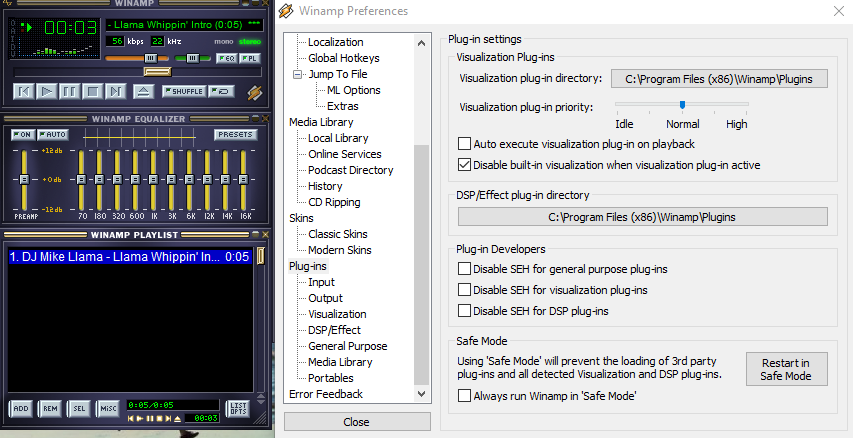
The skins need to go into the “Skins” folder in the Winamp directory. For most users, this is in C:\Program Files\Winamp\Skins, but it might be different if you chose another location when installing Winamp.

After the files are in the folder, open Winamp and go to the skins menu. Right-click anywhere on the player, choose “Skins” from the menu, and select the one you want from the list. The new skin will apply immediately.

This process works with all current versions of Winamp, including the latest updates for 2025. It’s quick, easy, and lets you change the look of Winamp whenever you like.

Why This Collection Stands Out

This collection brings together over 80,000 Winamp skins in one place. It’s organized and easy to download, saving users the time and effort of searching across outdated websites. Having everything in one bundle means you can explore and apply new designs without any hassle.

The range of designs is impressive, offering something for every taste. Minimalist themes provide a clean and simple look, while bold, colorful designs add a dynamic feel. This variety ensures that users can find the perfect skin to suit their preferences. Pulling together so many skins into one package makes it easier than ever to explore what Winamp has to offer. Users no longer have to sift through countless outdated websites to find quality designs. Everything is here, organized and ready to use.

This collection shows how Winamp remains relevant in a world full of modern music players. It continues to give users the ability to customize their experience in ways that other platforms simply don’t offer.

This bundle is proof that Winamp is still going strong. It’s keeping up with what users want and offering fresh, modern designs that fit today’s needs. Winamp continues to show that it’s a great choice for anyone looking for a customizable music player.

Does Anyone Other Than Grandpas Use Winamp?

Winamp may have a nostalgic charm, but calling it a grandpa’s music player is unfair. It’s more like that cool uncle who still listens to vinyl but also knows how to work Spotify. Sure, some people think Winamp is stuck in the past, but it’s alive, kicking, and blasting MP3s with style.

The truth is, Winamp isn’t just for people reminiscing about the days of dial-up internet and Napster. Plenty of younger users still swear by it, especially those who appreciate its customizability. Who doesn’t love a player that lets you make it look like a spaceship or a toaster? Modern apps don’t offer that kind of personality.

It’s worth noting that Winamp had over 83 million monthly users as of 2024. That’s not just grandpas—unless you think the internet is crawling with 83 million tech-savvy retirees who all happen to love classic media players. Winamp’s appeal stretches far beyond those sipping tea and reminiscing about the 90s.

Winamp has even modernized itself to stay relevant. It’s got new apps, updated features, and plans to open its source code for developers. You can’t tell me a grandpa would be excited about open-source development unless they’re a retired coder.

The full collection of Winamp skins is ready for you to download. With thousands of designs included, there’s something for every taste and style.

Getting these skins onto your player is simple. Download the bundle, follow the steps to move the files to the right folder, and start customizing your Winamp experience.

The entire collection is completely free. This is your chance to refresh the look of your music player and explore a huge variety of designs without spending a dime.

Best wishes for 2025!

Download Winamp Skins 2025 (parts 1, 2, 3, 4, 5, 6, 7, 8, 9, 10, 11, and 12)

Recommended version of Winamp
Winamp Visualizations

Winamp Visualizations

Date Released: 2000-2024
License: Free version
Author: N/A
An archive file: 401 MB
OS: Windows, Winamp
Last Updated: December 24, 2024

As a Winamp user you will already be familiar with the fact that WinAmp is a longstanding tool for listening to and cataloguing your music.

Winamp Visualization

It works as a one stop shop for managing your music library and it’s still free.  It allows you to sync your music collection to an MP3 player or smartphone, and you can also stream it over the internet, allowing you to share your favorite tunes with your friends. There have been other cataloguing tools that have come along but for sheer control of your own downloads it still stands out from the crowd as a powerful and customizable tool. WinAmp is also light compared to something like Itunes which has become an insatiable resource muncher. Additionally, you would be hard pressed to find another that’s as open to adding as many additional plug-ins. New skins also help to keep things fresh along with the vast array of plug ins available in the catalogue which give you the ability to boost 3D sound, graphic equalizers, crossfading, and support for the lossless FLAC format but for me the key thing is the visualizations that it allows you to create.

Winamp llama

When it comes to the visualizations there are a few built in standard options but there is still a huge community of current users that are actively developing exceptional plug ins to expand and improve it, so it never stands still. An array of spectral visualizations that you’re able to enjoy while listening to your favorite tracks is one of the best things ever invented. Initially music visualizers were the exclusive concern of music and tech nerds but with the more user friendly and specific plug in’s more people discovered the beauty of what they could create based on the audio frequencies and amplification of each track. Effective music visualization aims to attain a high degree of visual correlation between a track’s specific characteristics and the objects or components of the visual image being rendered and displayed.
These often, spectral visualizations allow you to fully personalise your listening experience onto a real time moving canvass, so you can immerse yourself in your music by creating an ever-changing spectacle of colour and movement. Techniques can range from super simple to gorgeously elaborate, which can often include a multitude and plurality of composited effects. The changes in the music’s loudness and frequency spectrum are often the key.

If you have put your creative side away maybe it’s time to dust of the jacket and take out your vinyl collection or old CD’s and explore the new catalogue available so you can take a walk on the visual wild side.

Huge archive of Winamp Visualizations. Over 2500 files in one archive. Winamp visualization will generate images and video based on the music being played.

Download Winamp Visualizations

Winamp Windows 11

Winamp for Windows 11

Last updated: October 06, 2024
File Size: 24.00 MB

Winamp, (Windows Advanced Multimedia Products) was first released on April 21, 1997, and created by Justin Frankel and Dmitry Boldyrev under the Nullsoft banner, is a media player that supports a variety of audio formats, including MP3, AAC, FLAC, WAV, and WMA.

Early versions of the player – named WinAMP as a combination of “Windows” and “AMP” (an abbreviation for the Advanced Multimedia Products MP3 file playback engine it employed) – had basic controls, but by the time version 1.006 was released a few months later, its iconic graphical user interface had taken shape.

Winamp was an instant success with early adopters. By mid-1998, the programme, which began as freeware but later switched to a shareware model, had been downloaded over 3 million times. This piqued the interest of major media companies, including AOL, which purchased Nullsoft in June 1999 for $80 million in stock and continued to operate it as a subsidiary.

Soon after, mainstream success followed. Winamp had 25 million registered users by June 2000, and only a year later it had surpassed the 60 million user mark. It was obvious that MP3s would be the next big thing in music. And they were for a while.

Winamp made it simple to make a playlist: simply drag files into the playlist window and begin listening. This, in conjunction with early file-sharing networks, altered how people discovered and listened to music. Winamp grew to 90 million users, before fading away into obscurity when the likes of iTunes came onto the scene with its relatively decluttered look and seamless search function. However, it is now making a comeback.

From 1997 to 2013, the original Winamp media player was under development, with the final version being v5.666.3516. An unfinished build of v5.8 was leaked in October 2018, and Radionomy (the owner of Winamp, now known as Shoutcast) decided to make it public. More updates were promised, but they were never delivered.

A live video included the seemingly impromptu appearance of a new app called Media Player, as reported by Windows Latest and other blogs. This appears to be a modern replacement for Windows Media Player, which debuted in Windows Millennium Edition and hasn’t been updated in years.

The newest version of Winamp for Windows 11 functions as a music library, allowing users to browse and play music, as well as create and manage playlists. In addition, any music and playlists from Groove Music will be automatically transferred to the Media Player, which will take the place of the Groove Music app. There’s also a dedicated playback mode that shows album art in full screen and mini player mode.

The new Media Player app may eventually replace the legacy Windows Media Player app that is currently available on Windows 11. However, Microsoft has stated that the legacy music app will remain available in Windows Tools. Also, because video and music are now combined, the standalone Movies & TV app is no longer required.

The company officially released Winamp’s first update in years. The update added support for Windows 11. Simultaneously, Radionomy (the new owners of Winamp) announced that they are working on a new Winamp for Windows and other platforms.

The updated website of Winamp includes a new statement indicating that the media player is making a comeback. Sign up for Winamp’s newsletters to be notified when the redesigned player is available for Windows 11, and other platforms.

Radionomy has not specified when the Media Player app will be made available to general users, but it has stated that during testing with Insiders, some issues were encountered that prevented playback from network locations. There are also a few bugs with editing album metadata, sorting library content with accented characters, and UI elements that ignore the user’s app theme preference.

The new Winamp appears to be more of an audio streaming platform, akin to Spotify or Pandora, than an update to a music player application. AudioValley could simply be using the Winamp name to generate publicity for an audio platform that is not very— there is a distinct lack of media players that are not simple web apps right now.

In addition, Radionomy intends to “add new ways to browse your music and video collections and manage your play queue.” [1]

There are plenty of third-party, potentially better alternatives to Windows Media Player, but the latter retains a special place in the hearts of many Windows users who grew up watching and listening to content on the default media app. Microsoft pushed its own first-party alternatives, namely Groove Music and the Movies & TV apps that debuted on the platform with Windows, out of the spotlight in Windows 11 and buried WMP in the menus.

Below you could find the Winamp for Windows 11 (Windows media player) with contains additions, cumulative set of all hotfixes, and security updates.

Download Winamp for Windows 11

References

[1] Microsoft: Here’s our new media player for Windows 11 to replace the Groove Music app, Liam Tung, Nov 2021, https://www.zdnet.com/article/microsoft-heres-our-new-media-player-for-windows-11-to-replace-the-groove-music-app/